Voicent Telephony CRM requires a relational database for
customer information. Microsoft offers a free
SQL Server
Express for anyone to download. The Expression edition should
be sufficient for most small businesses and organizations.
You can configure
Voicent Telephony CRM to run as a Windows service, so it will
automatically starts when your computer is booted. To do so,
select Setup > Options... from the program main menu,
then choose Run Program as a Windows Service.
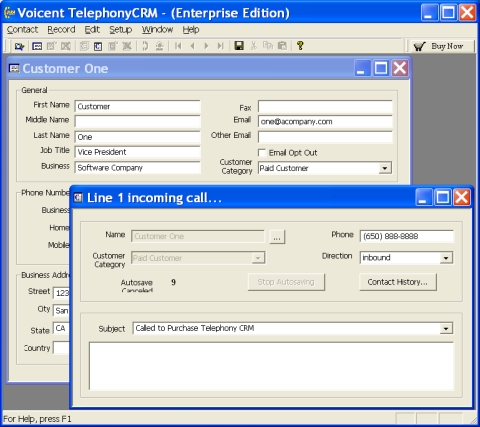
Whenever there is an incoming call, Telephony CRM
automatically displays a screen popup as shown below. You can
click Contact History button to get all customer contact
records, and click the button labeled ... to get customer
profile. Once the phone call is finished, this call record is
automatically saved.
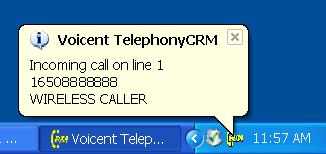
Besides the screen popup, you can also choose to have
Telephony CRM to show a information box in the Windows taskbar
notification area.
You can assign customers to different categories and have
the system automatically choose different IVR applications
based on customer category. For example, the system can
redirect calls from existing customers to post sale support
agents and other customers to an auto-attendant application.
To test the software or if you do not mind the trial message,
then use the shareware edition.
It is free and there is no time limit.
We offer three editions for Telephony CRM: shareware, professional,
and enterprise. Please see
Feature
comparison for details.
 Download
Now
Download
Now