
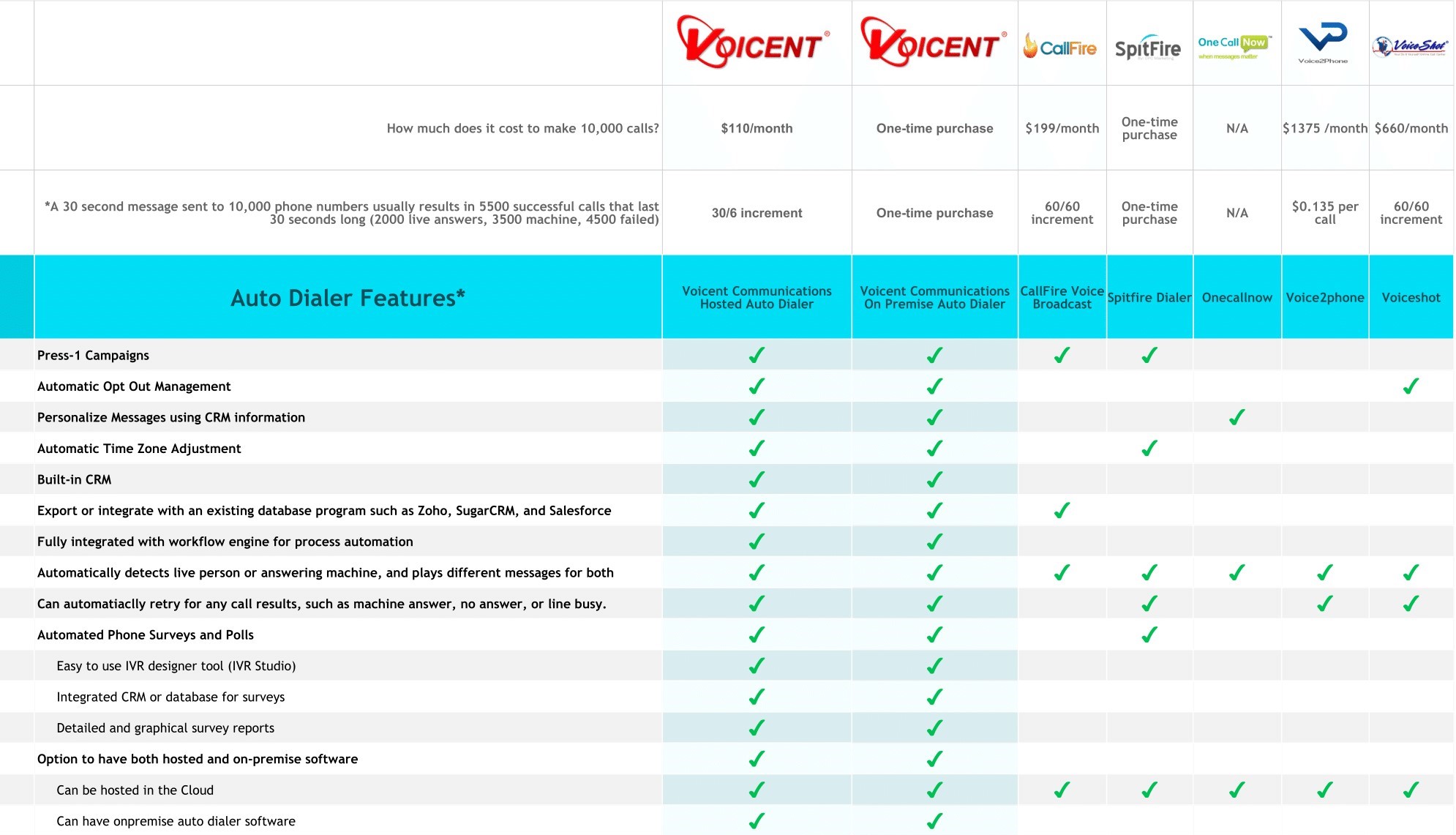
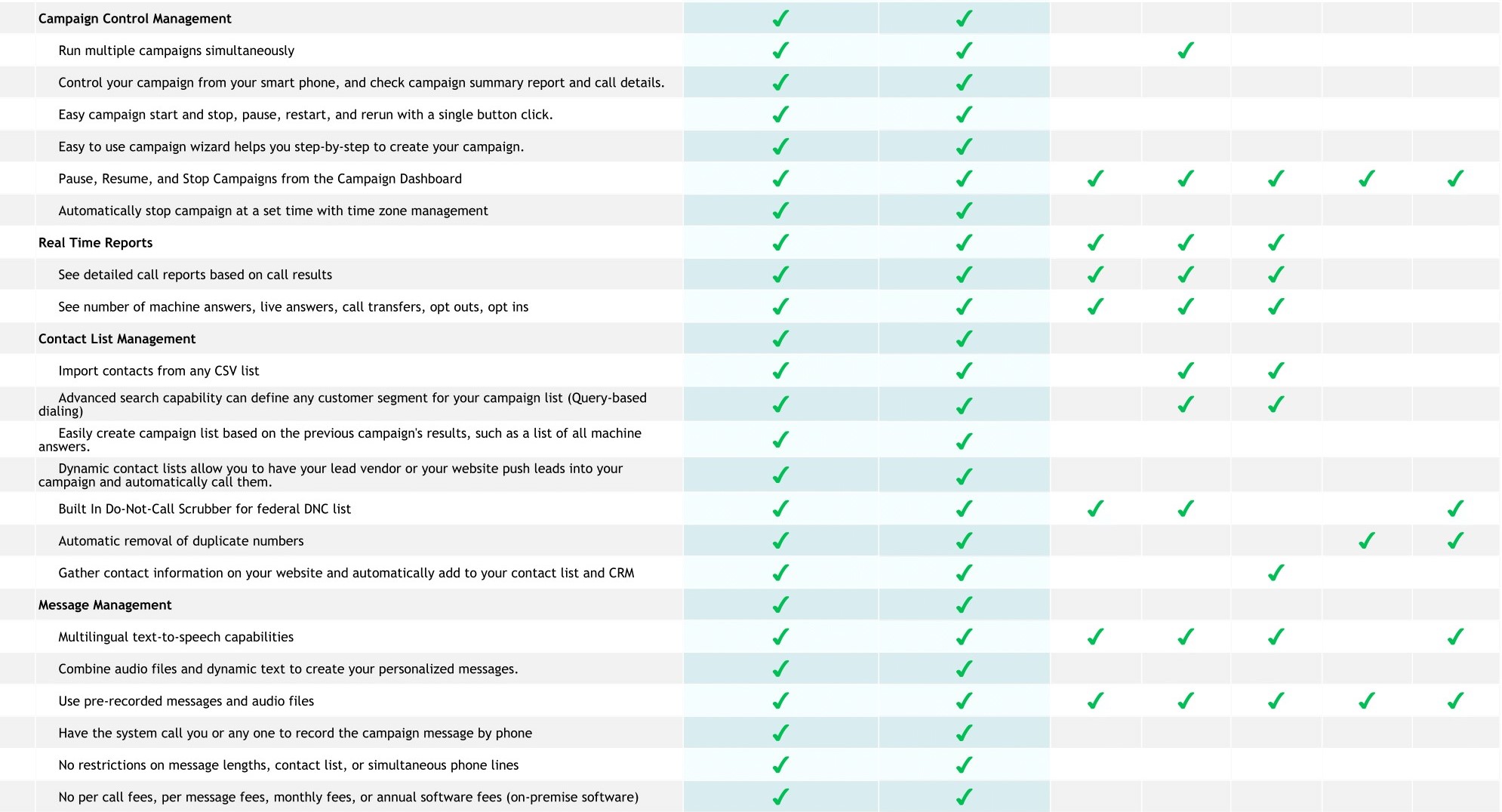
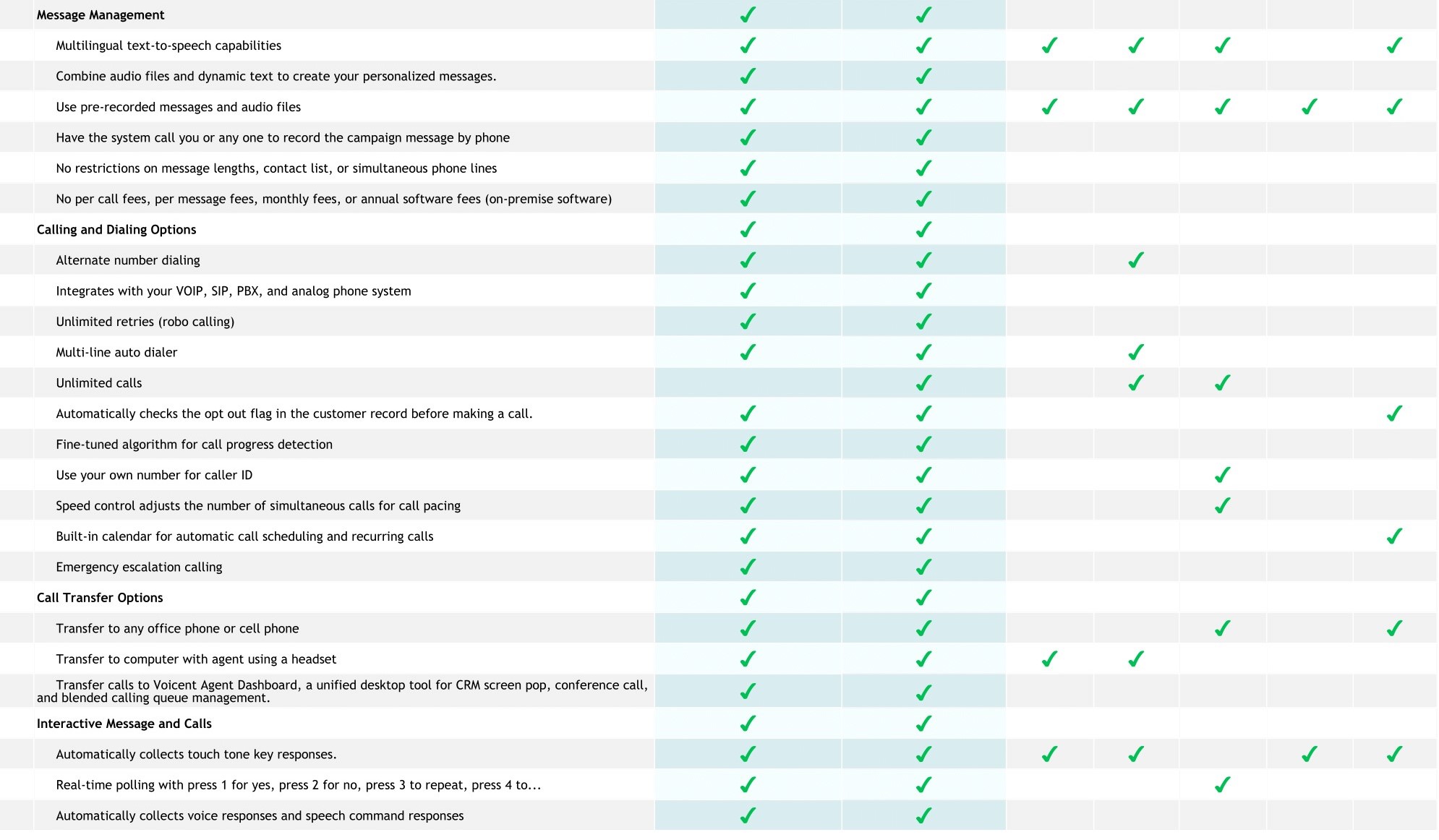
Auto Dialer Feature Index
Press-1 Campaigns
With press-1 campaigns, you and your agents talk only to prospects who are interested in what you offer.
Automatic Opt Out Management
When a callee presses a key to opt out, the customer record in Voicent CRM is marked Do Not Call, and any subsequent campaigns automatically skips the record.
Personalized Messages
Send customized messages with information from customer's CRM record or spreadsheet using real voices or text-to-speech.
Multiple Campaigns
Run multiple campaigns simultaneously, each with its own message, campaign options, call list, and transfer agents.
Mobile Control
Control your campaign from your smart phone, and check campaign summary report and call details.
Campaign Control
Easy campaign start and stop, pause, restart, and rerun with a single button click.
Campaign Result List
Easily create campaign lists based on a previous campaign's results, such as a list of all machine answers.
Dynamic List
Have your lead vendor or your website push leads into your campaign and automatically call them.
Do-Not-Call Scrubber
Our desktop auto dialer software contains a built-in Do-Not-Call scrubber for federal Do-Not-Call list.
Message Designer
Combine audio files and dynamic text to create your personalized messages.
Collect Responses
Automatically collects touch tone key or speech command responses.
Record By Phone
Have the system call you or any one to record the campaign message.
Transfer to Phone
Connect press-1 campaign to any office phone or cell phone.
Transfer To Computer
Transfer call to Voicent Agent Dashboard, a unified desktop tool for CRM screen pop, conference call, and blended calling queue management.
Works with Most Major Phone Services
Connect to your corporate PBX system or any VOIP service providers using our on premise software.
Automated Phone Survey
Use phone surveys for political campaigns, public policy research, consumer satisfaction, and polling.
Automatic Time Zone Adjustment
With Voicent's autodialing campaign, the time zone is automatically adjusted so you do not have to worry about calling people after a set time.
Smart Detection
Voicent Auto Dialer automatically detects answering machines, live answers, disconnected lines, and other call statuses.
Campaign Wizard
The easy to use campaign wizard helps you step-by-step to create your campaign.
Automatic Retry
Automatic retry for any call results, such as machine answer, no answer, or line busy.
Speed Control
Adjust the number of simultaneous calls during the campaign.
CSV Import List
The easy to use import wizard lets you import your spreadsheet data or any list in CSV format for any campaign.
Search List
Utilize Voicent CRM's simple and advanced search capability to define any customer segment for your campaign list.
Opt Out List
No need for a separate Opt Out list. Voicent Auto Dialer automatically checks the opt out flag in the customer record before making a call.
Audio Recording
Record your message using your own voice.
Text-to-Speech
Simply type in your message and have the computer generate the audio message for you automatically. (Plugin sold separately)
Machine Detection
Call progress detection algorithm fine tuned over the last 10 years to provide the best accuracy possible.
Caller ID
Use your own number for caller ID on our hosted service.
Broadcast Time
Automatically stop campaign at a set time with time zone management.
Campaign Report Features
Real-Time Reports

Campaign Features Screenshot
Take a Look
See your campaign results in real time. Summary report or detailed call info about each call.
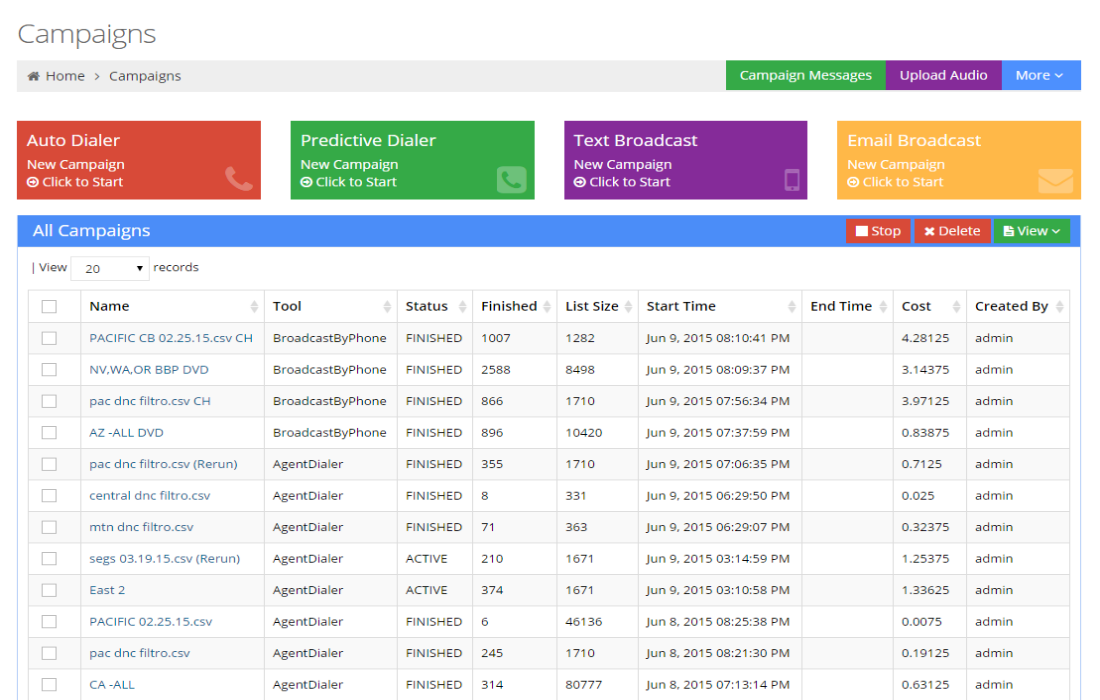
Campaign Dashboard
Campaign Features Screenshot
Take a Look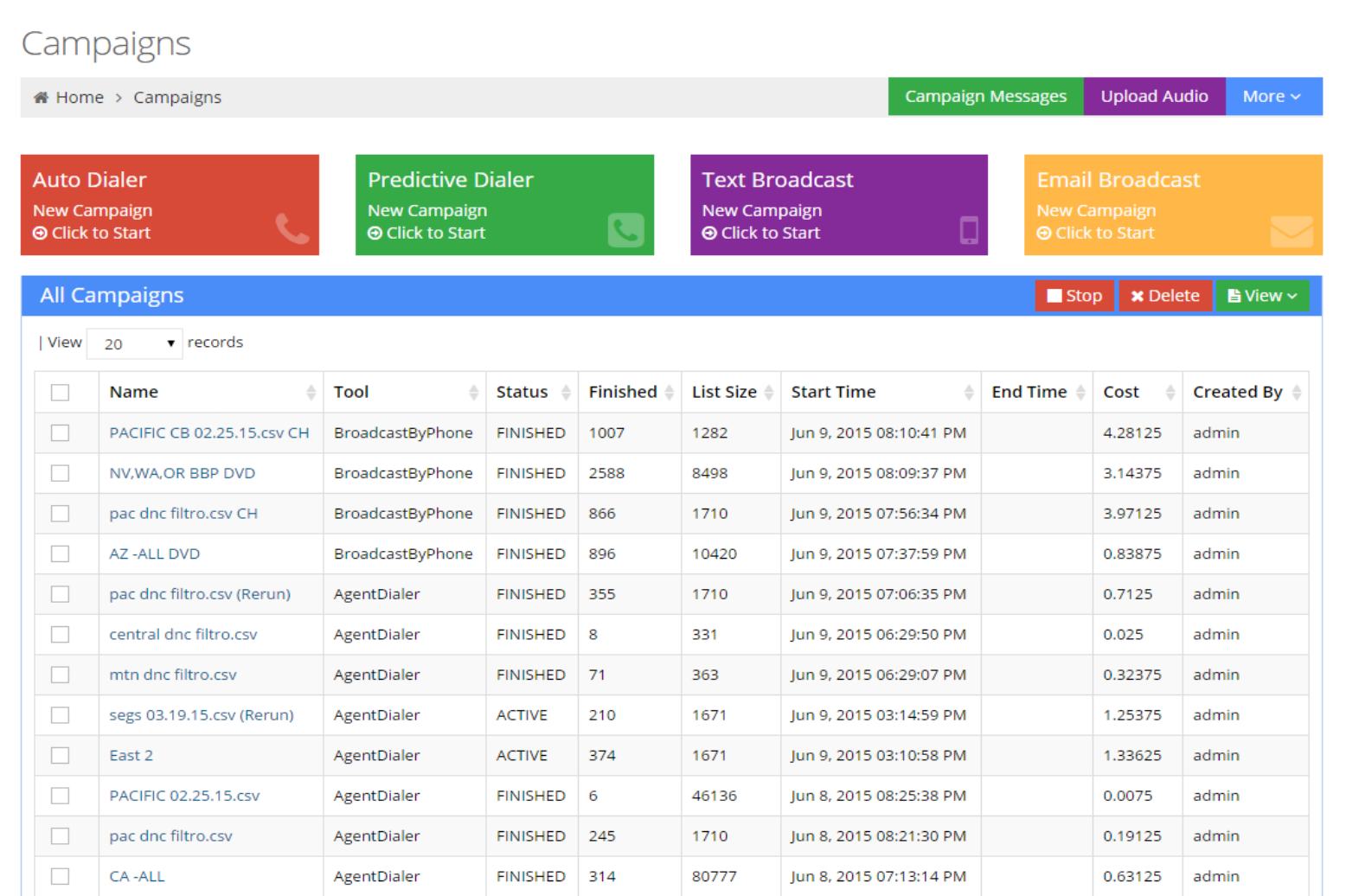
Campaign summary report updated automatically in real time. Easy control panel for pause and resume campaign.
Report Filter
Campaign Features Screenshot
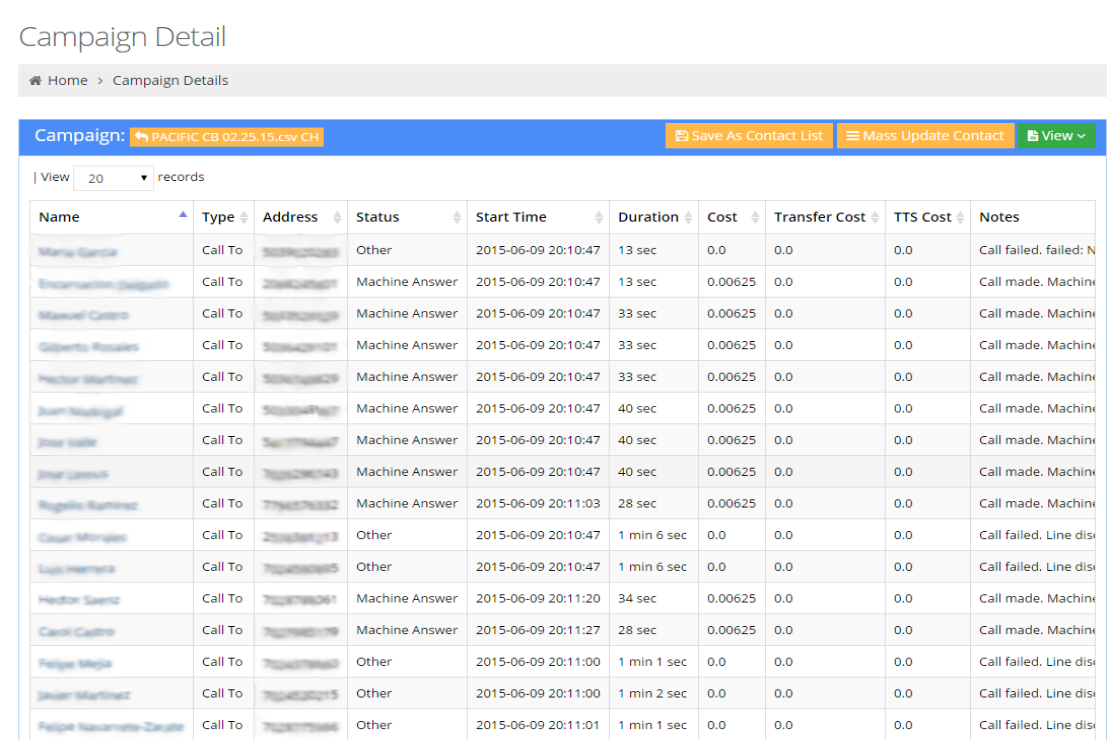
Take a LookSee detailed call report based on call results. Detailed results can be exported for tabular analysis.
Voicent Advantages
Scalable. Voicent auto dialer software is capable of running a few thousand simultaneous calls on a single computer. For a common desktop computer with Intel i7 processor, it is easy to run a few hundred simultaneous calls. For Voicent's cloud service, we have custom account for customers who need to make a few million calls per month.
Reliable. Voicent software has been used by thousands of customers worldwide. We have constantly fine tune the software to make it faster, easier, and more reliable over the last ten years.
Flexible. Whether you are a global call center or have a business just by yourself, Voicent has the solution for you. Choose our on premise software to own it or simply use our cloud auto dialer service. Add more capacity as you grow.
Fast & Easy. Easy download and setup the software with your phone system. With recommended settings, you can setup your own auto dialer software in less than an hour. With our cloud service, simply sign up and start your auto dialer campaign with just a few clicks.
Affordable. Buy-to-own software starts with just a few hundred dollars. With so much power packed into this easy-to-use auto dialer, we are so confident you will not be able to find such a great value for your investment. In addition to our free trial download, we also offer a 30 day money back guarentee.
Seamlessly integrated with Voicent CRM. Simply search your customer CRM and find the customer segment to call. All campaign contact information automatically saved in customer's CRM record. Advanced call disposition rules enable setting CRM field based on call result, such as set customer category to hot prospect when press 1 is detected.
Seamlessly integrated with Voicent Workflow Engine. If a machine can do the job, why bother to do it yourself? With Voicent's integrated workflow engine, setting up automated task is just a few clicks away. For example, sending an alert email to manager if a call is connected to an agent.
Developer Features. Our on premise software also provides command line options.
Auto Dialer
Related Links:
- Wiki
- VanillaSoft
- CallFire