
IVR Studio: Inbound IVR
On-hold messaging consists of a recorded message played over the phone to your potential clients while they’re on hold. The message can be simple music audio or contain valuable information about your company’s products, services, locations, or whatever information you think might be helpful to your customers
The Call Flow
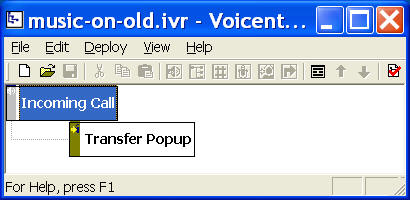
The call flow is trivial for music on hold applications. It consists of only one Call Transfer Element. A Call transfer element causes the current call to be transferred to another phone number, or transfer using the same line and pop up an alert window on a computer. For music on hold, or on hold message applications, you need to use same line transfer.
You can open this design by selecting Library > Music On Hold from the program main menu.
Setup Call Transfer
To setup Call Transfer, click the Voicent gateway icon and then choose Setup > Options > Call Transfer.

For more information about setting up call transfer, please click the Help button on the Call Transfer dialog window.
Setup Audio File for On Hold Message
From the Call Transfer Dialog window, select your audio file for on hold message. The format of the audio file needs to be: PCM 8KHz, 16 bit, mono. This format is the global standard for telephone communications. There is no restriction on the audio content. It can be music, English or Spanish, or mixed audio. For more information about audio, please see Audio Quality and Recording FAQ
Deployment
You can use the sample application as is. To deploy the application, select Deploy > Submit to Gateway... from the program main menu. If the menu item is grayed out, select Validate... first.
If you have multiple IVR application deployed, please see IVR select application for more information.
Once deployed, restart the gateway to have the changes to take effect.
When an incoming call is answered by the gateway, the application will execute the transfer element. A popup window will be displayed on your computer screen. If you have Enterprise Edition, you can have the window popup on a any computer. The caller will hear your on hold message. If the on hold message is finished before the call is answered by a human, it will play the message again.
To answer the call, pickup the phone that is connected to the same modem phone line, click the ANSWER button on the popup window. When done, click the Release button.