
IVR Studio: Inbound IVR
This sample extends the Voicemail 1 sample by adding more mailboxes and forwarding voicemail to email.
You can open this design by selecting Library > Voicemail to email from the program main menu.
The Call Flow
The call flow consists of one Choice element, two Record elements, and two Prompt elements. The choice element (Select Extension) asks a caller to select the mail box number (101 or 102). If the caller chooses extension 101 for example, the call flow is transitioned to a Recording element (John). Here the caller can leave a voice message. Once done (press # or hang up the phone), the call flow transitioned to a Prompt element (Voicemail to Email), which runs a Java program to forward the recorded message to John's email.
You can open this design by selecting Library > Voicemail to Email from the program main menu.
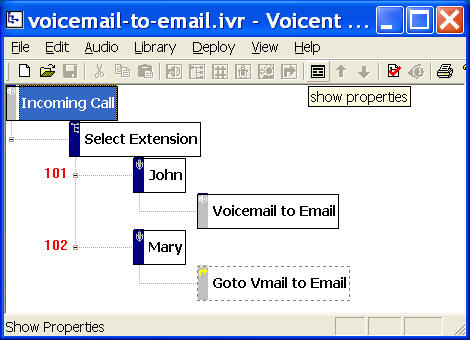
Forward Voicemail to Email
Open the property page (Right mouse click on an element, then choose Properties... from the popup menu.) for the Voicemail to Email element, select the Action tab, then click the New button. (For existing action, choose the Edit button.)
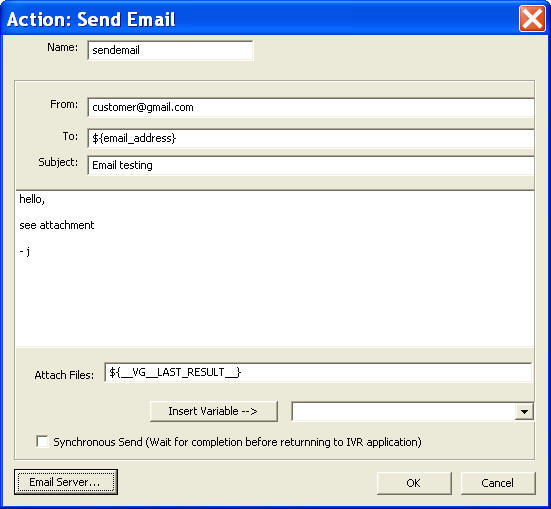
To send an email from your IVR application, use the following Email Action.
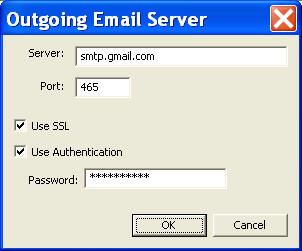
To set up your email server, click the Email Server... button. The following figure shows the settings for gmail.
The attached file is: __VG__LAST_RESULT__, which is the recorded voice message file.
Deployment
You can use the sample application as is. To deploy the application, select Deploy > Submit to Gateway... from the program main menu. If the menu item is grayed out, select Validate... first.
If you have multiple IVR application deployed, please see IVR select application for more information.
Once deployed, restart the gateway to have the changes to take effect.
When an incoming call is answered by the gateway, the caller is asked to choose a mail box number; the system then prompts the caller to record his message; once the recording is finished, an email with the voice message attached is sent to the voicemail owner.
You could also use a Java action to send our an email