
Share This Post:
Setup Voicent Software with Vonage
Voicent software works with Vonage VoIP soft phone directly. It does not need a Vonage router/ATA box to make calls. You must have Vonage soft phone service instead of their standard hard phone service. Please contact Vonage for a soft phone service if you don’t already have one.
If your call volume is high, you may need to get a Vonage business plan. Please be aware that all unlimited calling plans are for residential account with usage limit. Please contact Vonage for your calling plans.
Step 1: Collect Vonage SIP Information
If you have a Vonage business account, you can log in here. If you do not have a Vonage business account you can create one here.
After logging into to your account, obtain the following information:
1. SIP/Authorization ID
2. Registrar
3. SIP Password
To obtain the information above, click here.
Please Note the SIP password is NOT your regular Vonage account password. If you enter your account password instead of SIP password, you will most likely receive an error message like “Failed to start…”. You can find your SIP password after you log into your VoIP account. It is listed under the soft phone feature page. Or you can contact Vonage for your SIP password.
Step 2: Setup Voicent with Vonage
Now open the Voicent Sofware, proceed to Setup > Options > SIP > Add.
Fill in the information based on the data you gathered from Step 1:
Display Name: The name you want to display in the account
SIP ID/User ID: This is your Vonage SIP/Authorization ID
Domain: This is your Vonage Registrar information
Authorization User: This is your Vonage SIP/Authorization ID
Password: This is your Vonage SIP Password (not your account password!)
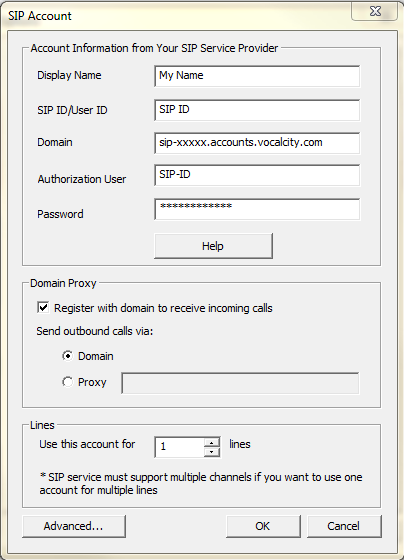
Click on OK to complete the SIP account setup.
Other settings
Stun Server: stun.xten.com (default port)
Codec: PCMU
Other Changes & Troubleshooting
Stun Server: stun.counterpath.com
Proxy: sphone.vopr.vonage.net:5061
Advanced->Discover Global IP Address(Used in most cases)
Share This Post: